基于模板引擎实现页面静态化
INFO
在一些大并发的场景下我们为了减少服务端的压力,有时候会将一些动态的数据页面进行静态化,比如电商场景下的商品详情页,因为这个页面的特点是访问量非常大,而且商品一旦上架发布也不会随意修改。静态化之后前端的用户请求就不用再去查接口获取数据了,只需要返回一个静态页面即可。只要做好数据变更后的及时更新,一般会带来非常大的性能优化。而我们要做页面静态化,就需要依赖一些模板引擎来做,这里用的是thymeleaf
本示例采用SpringBoot 2.2.13.RELEASE + tymeleaf 3.0.11.RELEASE
1、引入相关依赖
<dependencies>
    <dependency>
        <groupId>org.springframework.boot</groupId>
        <artifactId>spring-boot-starter-web</artifactId>
        <version>2.2.13.RELEASE</version>
    </dependency>

    <dependency>
        <groupId>org.springframework.boot</groupId>
        <artifactId>spring-boot-starter-thymeleaf</artifactId>
        <version>2.2.13.RELEASE</version>
        <exclusions>
            <exclusion>
                <groupId>org.springframework.boot</groupId>
                <artifactId>spring-boot-starter</artifactId>
            </exclusion>
        </exclusions>
    </dependency>
</dependencies>
2、创建模板
在resources目录下创建templates目录,并且创建一个index.html文件
<!DOCTYPE html>
<html xmlns:th="http://www.thymeleaf.org">
<head>
    <meta charset="UTF-8">
    <title>测试页面</title>
</head>
<body>
    <h1 th:text="${msg}">默认内容</h1>
</body>
</html>
3、添加配置
添加依赖完成后,在application.properties配置文件中添加thymeleaf相关的配置
spring.thymeleaf.prefix=classpath:/templates/
spring.thymeleaf.encoding=UTF-8
spring.thymeleaf.cache=false
spring.thymeleaf.suffix=.html
4、添加测试接口
import org.springframework.stereotype.Controller;
import org.springframework.web.bind.annotation.RequestMapping;
import org.thymeleaf.TemplateEngine;
import org.thymeleaf.context.Context;
import javax.annotation.Resource;
import javax.servlet.http.HttpServletResponse;
import java.io.*;

@Controller
@RequestMapping("/tpl")
public class IndexController {

    @Resource
    private TemplateEngine templateEngine;

    @RequestMapping("/index")
    public void index( HttpServletResponse response) throws IOException {
        Context context = new Context();
        context.setVariable("msg", "Hello Thymeleaf");
        Writer writer = new OutputStreamWriter(response.getOutputStream());
        templateEngine.process("index", context, writer);
    }
}
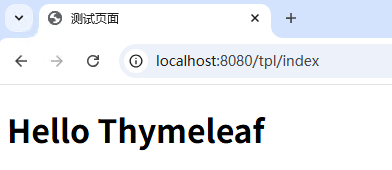
这里创建了一个controller,并且提供了一个接口,通过context传递了一个msg的参数到页面,然后templateEngine.process方法找到名为index的模板,将context里边设置的参数替换模板里边的变量,最终输出到writer,而这里这个writer指向了response的输出流,所以,最终程序执行的时候,这个接口返回的就是通过模板引擎和预制的模板渲染的一个HTML页面
5、生成静态文件
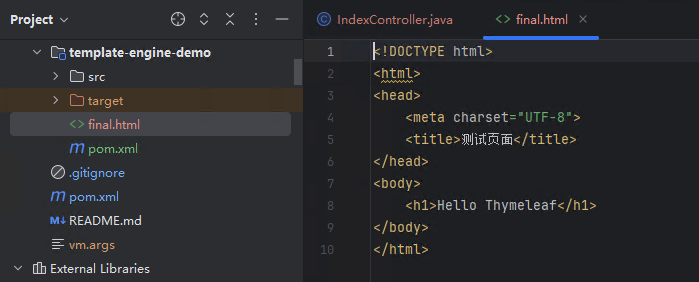
通过上面的简单代码,我们就可以得到一段html,只要将上面的writer指向一个文件输出流,我们就可以轻松生成一个渲染好的html
@RequestMapping(value = "/file", method = RequestMethod.GET)
@ResponseBody
public String file() throws IOException {
    Context context = new Context();
    context.setVariable("msg", "Hello Thymeleaf");
    PrintWriter writer = new PrintWriter(new File("D:\\datas\\Workspaces\\Gitee\\study\\template-engine-demo\\final.html"), "UTF-8");
    templateEngine.process("index", context, writer);
    return "模板渲染成功";
}
调用http://localhost:8080/tpl/file,可以看到指定路径下多了一个final.html文件,内容也是我们变量替换后的
6、商品详情页静态化思路
- 每次商品上架之前进行渲染
- 商品数据变更后及时更新