2、RocketMQ的3主3从集群部署
前面快速启动了一个单节点的rocketmq实例,并通过rocketmq自带的生产者消费者方式和java客户端方式体验了一下RocketMQ的基本用法,本文主要搭建一个3主3从的RocketMQ集群和web管理控制台
1、主机规划
| 主机 | nameserver | broker |
|---|---|---|
| 节点1:192.168.0.61 | node | broker-a(10911)、broker-b-s(11011)、broker-c-s(12011) |
| 节点2:192.168.0.62 | node | broker-a-s(11011)、broker-b(10911)、broker-c-s(12011) |
| 节点3:192.168.0.63 | node | broker-a-s(11011)、broker-b-s(12011)、broker-c(10911) |
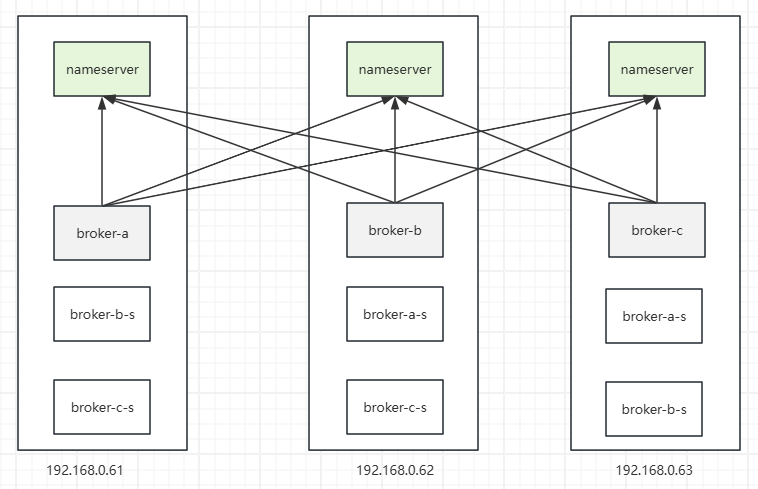
2、启动nameserver
在三个节点上分别执行nameserver启动脚本
# 后台启动nameserver
nohup /home/ubuntu/tools/rocketmq/rocketmq-all-5.5.1-bin-release/bin/mqnamesrv &

# 查看启动日志
tail -100f ~/logs/rocketmqlogs/namesrv.log
日志输出:
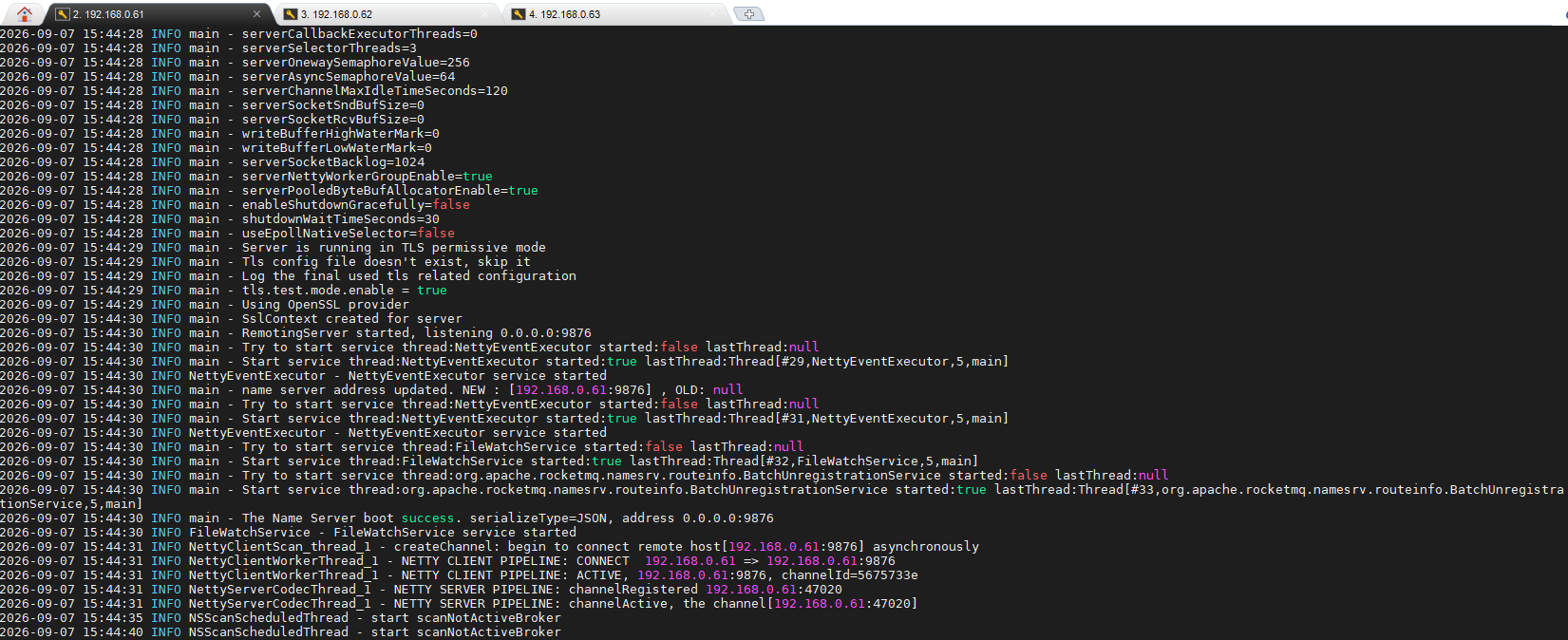
可以看到三个节点的nameserver都已经成功启动了
3、broker配置(注意路径)
进入config目录,可以看到默认只有单节点配置、2主0从、2主2从同步、2主2从异步:
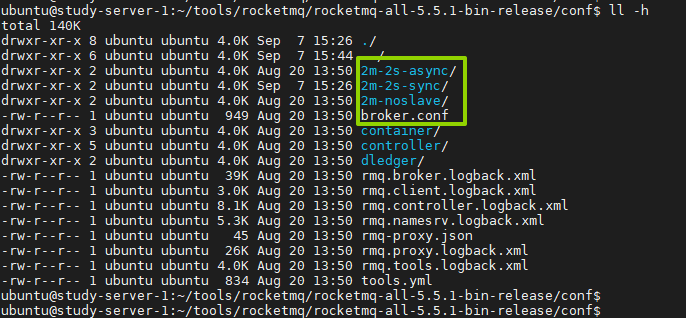
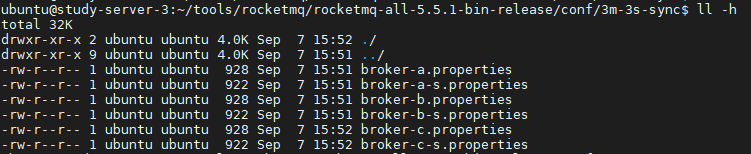
这里我们复制一个3主3从同步的配置
3.1、修改节点1上的配置
broker-a.properties
# 集群名称
brokerClusterName=Rocket-Cluster
# broker名字,主从节点名字一样
brokerName=broker-a
# brokerId,0-主节点,非0-从节点
brokerId=0
# nameserver的地址
namesrvAddr=192.168.0.61:9876;192.168.0.62:9876;192.168.0.63:9876
#在发送消息时,自动创建服务器不存在的topic,默认创建的队列数
defaultTopicQueueNums=4
#是否允许 Broker 自动创建Topic,建议线下开启,线上关闭
autoCreateTopicEnable=true
#是否允许 Broker 自动创建订阅组,建议线下开启,线上关闭
autoCreateSubscriptionGroup=true
#Broker 对外服务的监听端口
listenPort=10911
#删除文件时间点,默认凌晨 4点
deleteWhen=04
#文件保留时间,默认 48 小时
fileReservedTime=48
#commitLog每个文件的大小默认1G
mapedFileSizeCommitLog=1073741824
#ConsumeQueue每个文件默认存30W条,根据业务情况调整
mapedFileSizeConsumeQueue=300000
#destroyMapedFileIntervalForcibly=120000
#redeleteHangedFileInterval=120000
#检测物理文件磁盘空间
diskMaxUsedSpaceRatio=88
#存储路径
storePathRootDir=/home/ubuntu/tools/rocketmq/rocketmq-all-5.5.1-bin-release/conf/3m-3s-sync/data/store-a
#commitLog 存储路径
storePathCommitLog=/home/ubuntu/tools/rocketmq/rocketmq-all-5.5.1-bin-release/conf/3m-3s-sync/data/store-a/commitlog
#消费队列存储路径存储路径
storePathConsumeQueue=/home/ubuntu/tools/rocketmq/rocketmq-all-5.5.1-bin-release/conf/3m-3s-sync/data/store-a/consumequeue
#消息索引存储路径
storePathIndex=/home/ubuntu/tools/rocketmq/rocketmq-all-5.5.1-bin-release/conf/3m-3s-sync/data/store-a/index
#checkpoint 文件存储路径
storeCheckpoint=/home/ubuntu/tools/rocketmq/rocketmq-all-5.5.1-bin-release/conf/3m-3s-sync/data/store-a/checkpoint
#abort 文件存储路径
abortFile=/home/ubuntu/tools/rocketmq/rocketmq-all-5.5.1-bin-release/conf/3m-3s-sync/data/store-a/abort
#限制的消息大小
maxMessageSize=65536
#flushCommitLogLeastPages=4
#flushConsumeQueueLeastPages=2
#flushCommitLogThoroughInterval=10000
#flushConsumeQueueThoroughInterval=60000
#Broker 的角色
#- ASYNC_MASTER 异步复制Master
#- SYNC_MASTER 同步双写Master
#- SLAVE
brokerRole=SYNC_MASTER
#刷盘方式
#- ASYNC_FLUSH 异步刷盘
#- SYNC_FLUSH 同步刷盘
flushDiskType=ASYNC_FLUSH
#checkTransactionMessageEnable=false
#发消息线程池数量
#sendMessageThreadPoolNums=128
#拉消息线程池数量
#pullMessageThreadPoolNums=128
broker-b-s.properties
brokerClusterName=Rocket-Cluster
brokerName=broker-b
#0 表示 Master,>0 表示 Slave
brokerId=1
#nameServer地址,分号分割
namesrvAddr=192.168.0.61:9876;192.168.0.62:9876;192.168.0.63:9876
#在发送消息时,自动创建服务器不存在的topic,默认创建的队列数
defaultTopicQueueNums=4
#是否允许 Broker 自动创建Topic,建议线下开启,线上关闭
autoCreateTopicEnable=true
#是否允许 Broker 自动创建订阅组,建议线下开启,线上关闭
autoCreateSubscriptionGroup=true
#Broker 对外服务的监听端口
listenPort=11011
#删除文件时间点,默认凌晨 4点
deleteWhen=04
#文件保留时间,默认 48 小时
fileReservedTime=120
#commitLog每个文件的大小默认1G
mapedFileSizeCommitLog=1073741824
#ConsumeQueue每个文件默认存30W条,根据业务情况调整
mapedFileSizeConsumeQueue=300000
#destroyMapedFileIntervalForcibly=120000
#redeleteHangedFileInterval=120000
#检测物理文件磁盘空间
diskMaxUsedSpaceRatio=88
#存储路径
storePathRootDir=/home/ubuntu/tools/rocketmq/rocketmq-all-5.5.1-bin-release/conf/3m-3s-sync/data/store-b-s
#commitLog 存储路径
storePathCommitLog=/home/ubuntu/tools/rocketmq/rocketmq-all-5.5.1-bin-release/conf/3m-3s-sync/data/store-b-s/commitlog
#消费队列存储路径存储路径
storePathConsumeQueue=/home/ubuntu/tools/rocketmq/rocketmq-all-5.5.1-bin-release/conf/3m-3s-sync/data/store-b-s/consumequeue
#消息索引存储路径
storePathIndex=/home/ubuntu/tools/rocketmq/rocketmq-all-5.5.1-bin-release/conf/3m-3s-sync/data/store-b-s/index
#checkpoint 文件存储路径
storeCheckpoint=/home/ubuntu/tools/rocketmq/rocketmq-all-5.5.1-bin-release/conf/3m-3s-sync/data/store-b-s/checkpoint
#abort 文件存储路径
abortFile=/home/ubuntu/tools/rocketmq/rocketmq-all-5.5.1-bin-release/conf/3m-3s-sync/data/store-b-s/abort
#限制的消息大小
maxMessageSize=65536
#flushCommitLogLeastPages=4
#flushConsumeQueueLeastPages=2
#flushCommitLogThoroughInterval=10000
#flushConsumeQueueThoroughInterval=60000
#Broker 的角色
#- ASYNC_MASTER 异步复制Master
#- SYNC_MASTER 同步双写Master
#- SLAVE
brokerRole=SLAVE
#刷盘方式
#- ASYNC_FLUSH 异步刷盘
#- SYNC_FLUSH 同步刷盘
flushDiskType=ASYNC_FLUSH
#checkTransactionMessageEnable=false
#发消息线程池数量
#sendMessageThreadPoolNums=128
#拉消息线程池数量
#pullMessageThreadPoolNums=128
broker-c-s.properties
brokerClusterName=Rocket-Cluster
brokerName=broker-c
#0 表示 Master,>0 表示 Slave
brokerId=1
#nameServer地址,分号分割
namesrvAddr=192.168.0.61:9876;192.168.0.62:9876;192.168.0.63:9876
#在发送消息时,自动创建服务器不存在的topic,默认创建的队列数
defaultTopicQueueNums=4
#是否允许 Broker 自动创建Topic,建议线下开启,线上关闭
autoCreateTopicEnable=true
#是否允许 Broker 自动创建订阅组,建议线下开启,线上关闭
autoCreateSubscriptionGroup=true
#Broker 对外服务的监听端口
listenPort=11012
#删除文件时间点,默认凌晨 4点
deleteWhen=04
#文件保留时间,默认 48 小时
fileReservedTime=120
#commitLog每个文件的大小默认1G
mapedFileSizeCommitLog=1073741824
#ConsumeQueue每个文件默认存30W条,根据业务情况调整
mapedFileSizeConsumeQueue=300000
#destroyMapedFileIntervalForcibly=120000
#redeleteHangedFileInterval=120000
#检测物理文件磁盘空间
diskMaxUsedSpaceRatio=88
#存储路径
storePathRootDir=/home/ubuntu/tools/rocketmq/rocketmq-all-5.5.1-bin-release/conf/3m-3s-sync/data/store-c-s
#commitLog 存储路径
storePathCommitLog=/home/ubuntu/tools/rocketmq/rocketmq-all-5.5.1-bin-release/conf/3m-3s-sync/data/store-c-s/commitlog
#消费队列存储路径存储路径
storePathConsumeQueue=/home/ubuntu/tools/rocketmq/rocketmq-all-5.5.1-bin-release/conf/3m-3s-sync/data/store-c-s/consumequeue
#消息索引存储路径
storePathIndex=/home/ubuntu/tools/rocketmq/rocketmq-all-5.5.1-bin-release/conf/3m-3s-sync/data/store-c-s/index
#checkpoint 文件存储路径
storeCheckpoint=/home/ubuntu/tools/rocketmq/rocketmq-all-5.5.1-bin-release/conf/3m-3s-sync/data/store-c-s/checkpoint
#abort 文件存储路径
abortFile=/home/ubuntu/tools/rocketmq/rocketmq-all-5.5.1-bin-release/conf/3m-3s-sync/data/store-c-s/abort
#限制的消息大小
maxMessageSize=65536
#flushCommitLogLeastPages=4
#flushConsumeQueueLeastPages=2
#flushCommitLogThoroughInterval=10000
#flushConsumeQueueThoroughInterval=60000
#Broker 的角色
#- ASYNC_MASTER 异步复制Master
#- SYNC_MASTER 同步双写Master
#- SLAVE
brokerRole=SLAVE
#刷盘方式
#- ASYNC_FLUSH 异步刷盘
#- SYNC_FLUSH 同步刷盘
flushDiskType=ASYNC_FLUSH
#checkTransactionMessageEnable=false
#发消息线程池数量
#sendMessageThreadPoolNums=128
#拉消息线程池数量
#pullMessageThreadPoolNums=128
**注意:**这里配置5类文件存储目录,需要提前建好:
- storePathRootDir:数据存储路径
- storePathCommitLog:commitLog 存储路径
- storePathConsumeQueue:消费队列存储路径存储路径
- storePathIndex:消息索引存储路径
- storeCheckpoint:checkpoint 文件存储路径
- abortFile:abort 文件存储路径
3.2、修改节点2上的配置
broker-b.properties
# 集群名称
brokerClusterName=Rocket-Cluster
# broker名字,主从节点名字一样
brokerName=broker-b
# brokerId,0-主节点,非0-从节点
brokerId=0
# nameserver的地址
namesrvAddr=192.168.0.61:9876;192.168.0.62:9876;192.168.0.63:9876
#在发送消息时,自动创建服务器不存在的topic,默认创建的队列数
defaultTopicQueueNums=4
#是否允许 Broker 自动创建Topic,建议线下开启,线上关闭
autoCreateTopicEnable=true
#是否允许 Broker 自动创建订阅组,建议线下开启,线上关闭
autoCreateSubscriptionGroup=true
#Broker 对外服务的监听端口
listenPort=10911
#删除文件时间点,默认凌晨 4点
deleteWhen=04
#文件保留时间,默认 48 小时
fileReservedTime=48
#commitLog每个文件的大小默认1G
mapedFileSizeCommitLog=1073741824
#ConsumeQueue每个文件默认存30W条,根据业务情况调整
mapedFileSizeConsumeQueue=300000
#destroyMapedFileIntervalForcibly=120000
#redeleteHangedFileInterval=120000
#检测物理文件磁盘空间
diskMaxUsedSpaceRatio=88
#存储路径
storePathRootDir=/home/ubuntu/tools/rocketmq/rocketmq-all-5.5.1-bin-release/conf/3m-3s-sync/data/store-b
#commitLog 存储路径
storePathCommitLog=/home/ubuntu/tools/rocketmq/rocketmq-all-5.5.1-bin-release/conf/3m-3s-sync/data/store-b/commitlog
#消费队列存储路径存储路径
storePathConsumeQueue=/home/ubuntu/tools/rocketmq/rocketmq-all-5.5.1-bin-release/conf/3m-3s-sync/data/store-b/consumequeue
#消息索引存储路径
storePathIndex=/home/ubuntu/tools/rocketmq/rocketmq-all-5.5.1-bin-release/conf/3m-3s-sync/data/store-b/index
#checkpoint 文件存储路径
storeCheckpoint=/home/ubuntu/tools/rocketmq/rocketmq-all-5.5.1-bin-release/conf/3m-3s-sync/data/store-b/checkpoint
#abort 文件存储路径
abortFile=/home/ubuntu/tools/rocketmq/rocketmq-all-5.5.1-bin-release/conf/3m-3s-sync/data/store-b/abort
#限制的消息大小
maxMessageSize=65536
#flushCommitLogLeastPages=4
#flushConsumeQueueLeastPages=2
#flushCommitLogThoroughInterval=10000
#flushConsumeQueueThoroughInterval=60000
#Broker 的角色
#- ASYNC_MASTER 异步复制Master
#- SYNC_MASTER 同步双写Master
#- SLAVE
brokerRole=SYNC_MASTER
#刷盘方式
#- ASYNC_FLUSH 异步刷盘
#- SYNC_FLUSH 同步刷盘
flushDiskType=ASYNC_FLUSH
#checkTransactionMessageEnable=false
#发消息线程池数量
#sendMessageThreadPoolNums=128
#拉消息线程池数量
#pullMessageThreadPoolNums=128
broker-a-s.properties
brokerClusterName=Rocket-Cluster
brokerName=broker-a
#0 表示 Master,>0 表示 Slave
brokerId=1
#nameServer地址,分号分割
namesrvAddr=192.168.0.61:9876;192.168.0.62:9876;192.168.0.63:9876
#在发送消息时,自动创建服务器不存在的topic,默认创建的队列数
defaultTopicQueueNums=4
#是否允许 Broker 自动创建Topic,建议线下开启,线上关闭
autoCreateTopicEnable=true
#是否允许 Broker 自动创建订阅组,建议线下开启,线上关闭
autoCreateSubscriptionGroup=true
#Broker 对外服务的监听端口
listenPort=11012
#删除文件时间点,默认凌晨 4点
deleteWhen=04
#文件保留时间,默认 48 小时
fileReservedTime=120
#commitLog每个文件的大小默认1G
mapedFileSizeCommitLog=1073741824
#ConsumeQueue每个文件默认存30W条,根据业务情况调整
mapedFileSizeConsumeQueue=300000
#destroyMapedFileIntervalForcibly=120000
#redeleteHangedFileInterval=120000
#检测物理文件磁盘空间
diskMaxUsedSpaceRatio=88
#存储路径
storePathRootDir=/home/ubuntu/tools/rocketmq/rocketmq-all-5.5.1-bin-release/conf/3m-3s-sync/data/store-a-s
#commitLog 存储路径
storePathCommitLog=/home/ubuntu/tools/rocketmq/rocketmq-all-5.5.1-bin-release/conf/3m-3s-sync/data/store-a-s/commitlog
#消费队列存储路径存储路径
storePathConsumeQueue=/home/ubuntu/tools/rocketmq/rocketmq-all-5.5.1-bin-release/conf/3m-3s-sync/data/store-a-s/consumequeue
#消息索引存储路径
storePathIndex=/home/ubuntu/tools/rocketmq/rocketmq-all-5.5.1-bin-release/conf/3m-3s-sync/data/store-a-s/index
#checkpoint 文件存储路径
storeCheckpoint=/home/ubuntu/tools/rocketmq/rocketmq-all-5.5.1-bin-release/conf/3m-3s-sync/data/store-a-s/checkpoint
#abort 文件存储路径
abortFile=/home/ubuntu/tools/rocketmq/rocketmq-all-5.5.1-bin-release/conf/3m-3s-sync/data/store-a-s/abort
#限制的消息大小
maxMessageSize=65536
#flushCommitLogLeastPages=4
#flushConsumeQueueLeastPages=2
#flushCommitLogThoroughInterval=10000
#flushConsumeQueueThoroughInterval=60000
#Broker 的角色
#- ASYNC_MASTER 异步复制Master
#- SYNC_MASTER 同步双写Master
#- SLAVE
brokerRole=SLAVE
#刷盘方式
#- ASYNC_FLUSH 异步刷盘
#- SYNC_FLUSH 同步刷盘
flushDiskType=ASYNC_FLUSH
#checkTransactionMessageEnable=false
#发消息线程池数量
#sendMessageThreadPoolNums=128
#拉消息线程池数量
#pullMessageThreadPoolNums=128
broker-c-s.properties
brokerClusterName=Rocket-Cluster
brokerName=broker-c
#0 表示 Master,>0 表示 Slave
brokerId=1
#nameServer地址,分号分割
namesrvAddr=192.168.0.61:9876;192.168.0.62:9876;192.168.0.63:9876
#在发送消息时,自动创建服务器不存在的topic,默认创建的队列数
defaultTopicQueueNums=4
#是否允许 Broker 自动创建Topic,建议线下开启,线上关闭
autoCreateTopicEnable=true
#是否允许 Broker 自动创建订阅组,建议线下开启,线上关闭
autoCreateSubscriptionGroup=true
#Broker 对外服务的监听端口
listenPort=11012
#删除文件时间点,默认凌晨 4点
deleteWhen=04
#文件保留时间,默认 48 小时
fileReservedTime=120
#commitLog每个文件的大小默认1G
mapedFileSizeCommitLog=1073741824
#ConsumeQueue每个文件默认存30W条,根据业务情况调整
mapedFileSizeConsumeQueue=300000
#destroyMapedFileIntervalForcibly=120000
#redeleteHangedFileInterval=120000
#检测物理文件磁盘空间
diskMaxUsedSpaceRatio=88
#存储路径
storePathRootDir=/home/ubuntu/tools/rocketmq/rocketmq-all-5.5.1-bin-release/conf/3m-3s-sync/data/store-c-s
#commitLog 存储路径
storePathCommitLog=/home/ubuntu/tools/rocketmq/rocketmq-all-5.5.1-bin-release/conf/3m-3s-sync/data/store-c-s/commitlog
#消费队列存储路径存储路径
storePathConsumeQueue=/home/ubuntu/tools/rocketmq/rocketmq-all-5.5.1-bin-release/conf/3m-3s-sync/data/store-c-s/consumequeue
#消息索引存储路径
storePathIndex=/home/ubuntu/tools/rocketmq/rocketmq-all-5.5.1-bin-release/conf/3m-3s-sync/data/store-c-s/index
#checkpoint 文件存储路径
storeCheckpoint=/home/ubuntu/tools/rocketmq/rocketmq-all-5.5.1-bin-release/conf/3m-3s-sync/data/store-c-s/checkpoint
#abort 文件存储路径
abortFile=/home/ubuntu/tools/rocketmq/rocketmq-all-5.5.1-bin-release/conf/3m-3s-sync/data/store-c-s/abort
#限制的消息大小
maxMessageSize=65536
#flushCommitLogLeastPages=4
#flushConsumeQueueLeastPages=2
#flushCommitLogThoroughInterval=10000
#flushConsumeQueueThoroughInterval=60000
#Broker 的角色
#- ASYNC_MASTER 异步复制Master
#- SYNC_MASTER 同步双写Master
#- SLAVE
brokerRole=SLAVE
#刷盘方式
#- ASYNC_FLUSH 异步刷盘
#- SYNC_FLUSH 同步刷盘
flushDiskType=ASYNC_FLUSH
#checkTransactionMessageEnable=false
#发消息线程池数量
#sendMessageThreadPoolNums=128
#拉消息线程池数量
#pullMessageThreadPoolNums=128
3.3、修改节点3上的配置
broker-c.properties
brokerClusterName=Rocket-Cluster
# broker名字,主从节点名字一样
brokerName=broker-c
# brokerId,0-主节点,非0-从节点
brokerId=0
# nameserver的地址
namesrvAddr=192.168.0.61:9876;192.168.0.62:9876;192.168.0.63:9876
#在发送消息时,自动创建服务器不存在的topic,默认创建的队列数
defaultTopicQueueNums=4
#是否允许 Broker 自动创建Topic,建议线下开启,线上关闭
autoCreateTopicEnable=true
#是否允许 Broker 自动创建订阅组,建议线下开启,线上关闭
autoCreateSubscriptionGroup=true
#Broker 对外服务的监听端口
listenPort=10911
#删除文件时间点,默认凌晨 4点
deleteWhen=04
#文件保留时间,默认 48 小时
fileReservedTime=48
#commitLog每个文件的大小默认1G
mapedFileSizeCommitLog=1073741824
#ConsumeQueue每个文件默认存30W条,根据业务情况调整
mapedFileSizeConsumeQueue=300000
#destroyMapedFileIntervalForcibly=120000
#redeleteHangedFileInterval=120000
#检测物理文件磁盘空间
diskMaxUsedSpaceRatio=88
#存储路径
storePathRootDir=/home/ubuntu/tools/rocketmq/rocketmq-all-5.5.1-bin-release/conf/3m-3s-sync/data/store-c
#commitLog 存储路径
storePathCommitLog=/home/ubuntu/tools/rocketmq/rocketmq-all-5.5.1-bin-release/conf/3m-3s-sync/data/store-c/commitlog
#消费队列存储路径存储路径
storePathConsumeQueue=/home/ubuntu/tools/rocketmq/rocketmq-all-5.5.1-bin-release/conf/3m-3s-sync/data/store-c/consumequeue
#消息索引存储路径
storePathIndex=/home/ubuntu/tools/rocketmq/rocketmq-all-5.5.1-bin-release/conf/3m-3s-sync/data/store-c/index
#checkpoint 文件存储路径
storeCheckpoint=/home/ubuntu/tools/rocketmq/rocketmq-all-5.5.1-bin-release/conf/3m-3s-sync/data/store-c/checkpoint
#abort 文件存储路径
abortFile=/home/ubuntu/tools/rocketmq/rocketmq-all-5.5.1-bin-release/conf/3m-3s-sync/data/store-c/abort
#限制的消息大小
maxMessageSize=65536
#flushCommitLogLeastPages=4
#flushConsumeQueueLeastPages=2
#flushCommitLogThoroughInterval=10000
#flushConsumeQueueThoroughInterval=60000
#Broker 的角色
#- ASYNC_MASTER 异步复制Master
#- SYNC_MASTER 同步双写Master
#- SLAVE
brokerRole=SYNC_MASTER
#刷盘方式
#- ASYNC_FLUSH 异步刷盘
#- SYNC_FLUSH 同步刷盘
flushDiskType=ASYNC_FLUSH
#checkTransactionMessageEnable=false
#发消息线程池数量
#sendMessageThreadPoolNums=128
#拉消息线程池数量
#pullMessageThreadPoolNums=128
broker-a-s.properties
brokerClusterName=Rocket-Cluster
brokerName=broker-a
#0 表示 Master,>0 表示 Slave
brokerId=1
#nameServer地址,分号分割
namesrvAddr=192.168.0.61:9876;192.168.0.62:9876;192.168.0.63:9876
#在发送消息时,自动创建服务器不存在的topic,默认创建的队列数
defaultTopicQueueNums=4
#是否允许 Broker 自动创建Topic,建议线下开启,线上关闭
autoCreateTopicEnable=true
#是否允许 Broker 自动创建订阅组,建议线下开启,线上关闭
autoCreateSubscriptionGroup=true
#Broker 对外服务的监听端口
listenPort=11012
#删除文件时间点,默认凌晨 4点
deleteWhen=04
#文件保留时间,默认 48 小时
fileReservedTime=120
#commitLog每个文件的大小默认1G
mapedFileSizeCommitLog=1073741824
#ConsumeQueue每个文件默认存30W条,根据业务情况调整
mapedFileSizeConsumeQueue=300000
#destroyMapedFileIntervalForcibly=120000
#redeleteHangedFileInterval=120000
#检测物理文件磁盘空间
diskMaxUsedSpaceRatio=88
#存储路径
storePathRootDir=/home/ubuntu/tools/rocketmq/rocketmq-all-5.5.1-bin-release/conf/3m-3s-sync/data/store-a-s
#commitLog 存储路径
storePathCommitLog=/home/ubuntu/tools/rocketmq/rocketmq-all-5.5.1-bin-release/conf/3m-3s-sync/data/store-a-s/commitlog
#消费队列存储路径存储路径
storePathConsumeQueue=/home/ubuntu/tools/rocketmq/rocketmq-all-5.5.1-bin-release/conf/3m-3s-sync/data/store-a-s/consumequeue
#消息索引存储路径
storePathIndex=/home/ubuntu/tools/rocketmq/rocketmq-all-5.5.1-bin-release/conf/3m-3s-sync/data/store-a-s/index
#checkpoint 文件存储路径
storeCheckpoint=/home/ubuntu/tools/rocketmq/rocketmq-all-5.5.1-bin-release/conf/3m-3s-sync/data/store-a-s/checkpoint
#abort 文件存储路径
abortFile=/home/ubuntu/tools/rocketmq/rocketmq-all-5.5.1-bin-release/conf/3m-3s-sync/data/store-a-s/abort
#限制的消息大小
maxMessageSize=65536
#flushCommitLogLeastPages=4
#flushConsumeQueueLeastPages=2
#flushCommitLogThoroughInterval=10000
#flushConsumeQueueThoroughInterval=60000
#Broker 的角色
#- ASYNC_MASTER 异步复制Master
#- SYNC_MASTER 同步双写Master
#- SLAVE
brokerRole=SLAVE
#刷盘方式
#- ASYNC_FLUSH 异步刷盘
#- SYNC_FLUSH 同步刷盘
flushDiskType=ASYNC_FLUSH
#checkTransactionMessageEnable=false
#发消息线程池数量
#sendMessageThreadPoolNums=128
#拉消息线程池数量
#pullMessageThreadPoolNums=128
broker-b-s.properties
brokerClusterName=Rocket-Cluster
brokerName=broker-b
#0 表示 Master,>0 表示 Slave
brokerId=1
#nameServer地址,分号分割
namesrvAddr=192.168.0.61:9876;192.168.0.62:9876;192.168.0.63:9876
#在发送消息时,自动创建服务器不存在的topic,默认创建的队列数
defaultTopicQueueNums=4
#是否允许 Broker 自动创建Topic,建议线下开启,线上关闭
autoCreateTopicEnable=true
#是否允许 Broker 自动创建订阅组,建议线下开启,线上关闭
autoCreateSubscriptionGroup=true
#Broker 对外服务的监听端口
listenPort=11011
#删除文件时间点,默认凌晨 4点
deleteWhen=04
#文件保留时间,默认 48 小时
fileReservedTime=120
#commitLog每个文件的大小默认1G
mapedFileSizeCommitLog=1073741824
#ConsumeQueue每个文件默认存30W条,根据业务情况调整
mapedFileSizeConsumeQueue=300000
#destroyMapedFileIntervalForcibly=120000
#redeleteHangedFileInterval=120000
#检测物理文件磁盘空间
diskMaxUsedSpaceRatio=88
#存储路径
storePathRootDir=/home/ubuntu/tools/rocketmq/rocketmq-all-5.5.1-bin-release/conf/3m-3s-sync/data/store-b-s
#commitLog 存储路径
storePathCommitLog=/home/ubuntu/tools/rocketmq/rocketmq-all-5.5.1-bin-release/conf/3m-3s-sync/data/store-b-s/commitlog
#消费队列存储路径存储路径
storePathConsumeQueue=/home/ubuntu/tools/rocketmq/rocketmq-all-5.5.1-bin-release/conf/3m-3s-sync/data/store-b-s/consumequeue
#消息索引存储路径
storePathIndex=/home/ubuntu/tools/rocketmq/rocketmq-all-5.5.1-bin-release/conf/3m-3s-sync/data/store-b-s/index
#checkpoint 文件存储路径
storeCheckpoint=/home/ubuntu/tools/rocketmq/rocketmq-all-5.5.1-bin-release/conf/3m-3s-sync/data/store-b-s/checkpoint
#abort 文件存储路径
abortFile=/home/ubuntu/tools/rocketmq/rocketmq-all-5.5.1-bin-release/conf/3m-3s-sync/data/store-b-s/abort
#限制的消息大小
maxMessageSize=65536
#flushCommitLogLeastPages=4
#flushConsumeQueueLeastPages=2
#flushCommitLogThoroughInterval=10000
#flushConsumeQueueThoroughInterval=60000
#Broker 的角色
#- ASYNC_MASTER 异步复制Master
#- SYNC_MASTER 同步双写Master
#- SLAVE
brokerRole=SLAVE
#刷盘方式
#- ASYNC_FLUSH 异步刷盘
#- SYNC_FLUSH 同步刷盘
flushDiskType=ASYNC_FLUSH
#checkTransactionMessageEnable=false
#发消息线程池数量
#sendMessageThreadPoolNums=128
#拉消息线程池数量
#pullMessageThreadPoolNums=128
4、启动
4.1、在节点1上执行
# 启动broker-a
nohup /home/ubuntu/tools/rocketmq/rocketmq-all-5.5.1-bin-release/bin/mqbroker -c /home/ubuntu/tools/rocketmq/rocketmq-all-5.5.1-bin-release/conf/3m-3s-sync/broker-a.properties &

# 启动broker-b-s
nohup /home/ubuntu/tools/rocketmq/rocketmq-all-5.5.1-bin-release/bin/mqbroker -c /home/ubuntu/tools/rocketmq/rocketmq-all-5.5.1-bin-release/conf/3m-3s-sync/broker-b-s.properties &

# 启动broker-c-s
nohup /home/ubuntu/tools/rocketmq/rocketmq-all-5.5.1-bin-release/bin/mqbroker -c /home/ubuntu/tools/rocketmq/rocketmq-all-5.5.1-bin-release/conf/3m-3s-sync/broker-c-s.properties &
4.2、在节点2上执行
# 启动broker-b
nohup /home/ubuntu/tools/rocketmq/rocketmq-all-5.5.1-bin-release/bin/mqbroker -c /home/ubuntu/tools/rocketmq/rocketmq-all-5.5.1-bin-release/conf/3m-3s-sync/broker-b.properties &

# 启动broker-a-s
nohup /home/ubuntu/tools/rocketmq/rocketmq-all-5.5.1-bin-release/bin/mqbroker -c /home/ubuntu/tools/rocketmq/rocketmq-all-5.5.1-bin-release/conf/3m-3s-sync/broker-a-s.properties &

# 启动broker-c-s
nohup /home/ubuntu/tools/rocketmq/rocketmq-all-5.5.1-bin-release/bin/mqbroker -c /home/ubuntu/tools/rocketmq/rocketmq-all-5.5.1-bin-release/conf/3m-3s-sync/broker-c-s.properties &
4.3、在节点3上执行
# 启动broker-c
nohup /home/ubuntu/tools/rocketmq/rocketmq-all-5.5.1-bin-release/bin/mqbroker -c /home/ubuntu/tools/rocketmq/rocketmq-all-5.5.1-bin-release/conf/3m-3s-sync/broker-c.properties &

# 启动broker-a-s
nohup /home/ubuntu/tools/rocketmq/rocketmq-all-5.5.1-bin-release/bin/mqbroker -c /home/ubuntu/tools/rocketmq/rocketmq-all-5.5.1-bin-release/conf/3m-3s-sync/broker-a-s.properties &

# 启动broker-b-s
nohup /home/ubuntu/tools/rocketmq/rocketmq-all-5.5.1-bin-release/bin/mqbroker -c /home/ubuntu/tools/rocketmq/rocketmq-all-5.5.1-bin-release/conf/3m-3s-sync/broker-b-s.properties &
5、检查集群状态
通过mqadmin命令可以插件集群的状态
mqadmin clusterlist -n 192.168.0.61:9876\;192.168.0.62:9876\;192.168.0.63:9876
结果如下,3主3从集群运行正常:

6、Web管理控制台
6.1、下载 & 打包
和kafka一样,RocketMQ并没有自带类似RabbitMQ的web-manager的控制台,需要自己单独部署,项目地址:
https://github.com/apache/rocketmq-dashboard
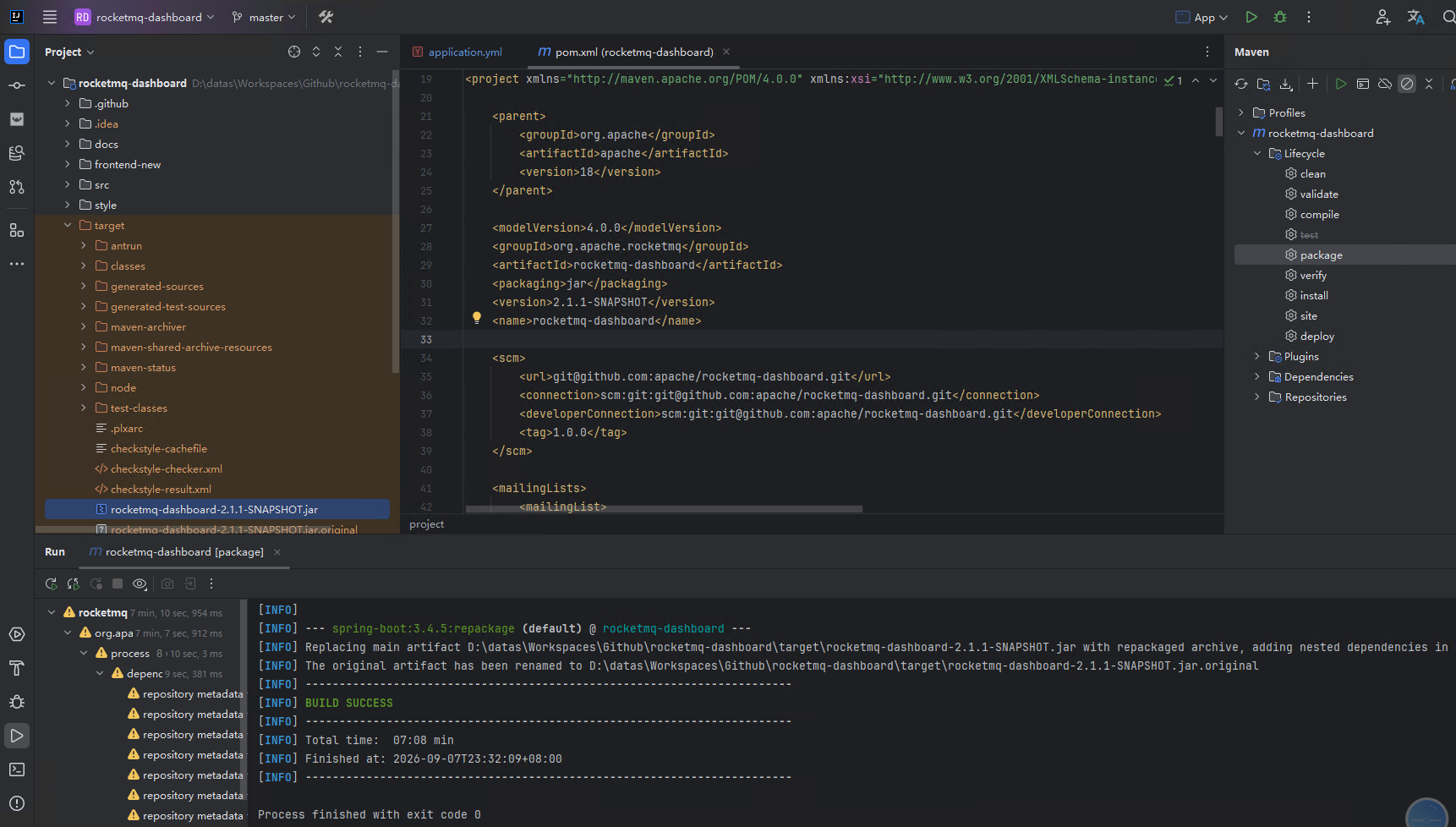
下载源码,用命令行或者IDE进行打包,在target下可以得到一个可运行的jar包:
6.2、运行
nohup java -jar rocketmq-dashboard-2.1.1-SNAPSHOT.jar --server.port=8080 --rocketmq.config.namesrvAddr=192.168.0.61:9876;192.168.0.62:9876;192.168.0.63:9876 >> ./mq-console.log 2>&1 &
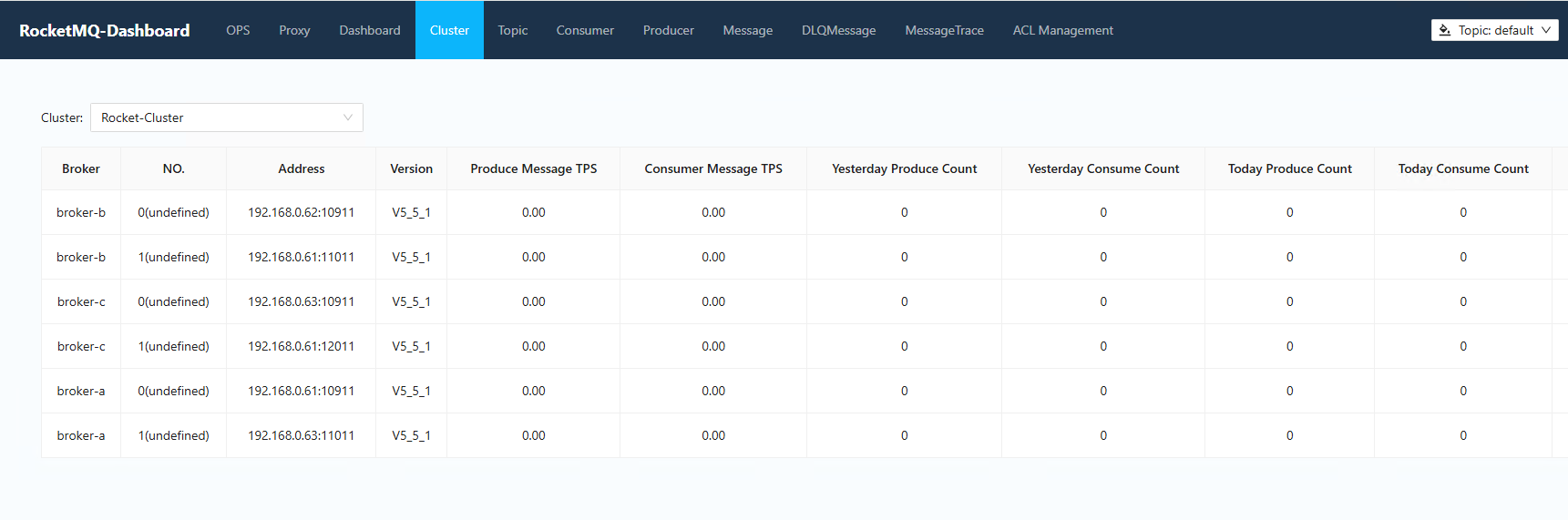
启动成功之后打开浏览器页面:http://[ip]:8080,默认端口号是8082,默认连接的nameserver地址是127.0.0.1:9876,且无需账号密码就可以直接进入
要想通过账号密码登录,需要修改application.properties文件:
rocketmq:
  config:
    loginRequired: true
账号密码配置在users.properties
# Define Admin
super=admin,1
# Define Users
user1=user
user2=user
这里的意思是定义了一个管理员账户super,密码是admin,同时定义了两个普通账户user1和user2,密码都是user。其中格式未:账号=密码{,角色},角色为可选值,值为1的时候表示是管理员,其它值就是普通账户
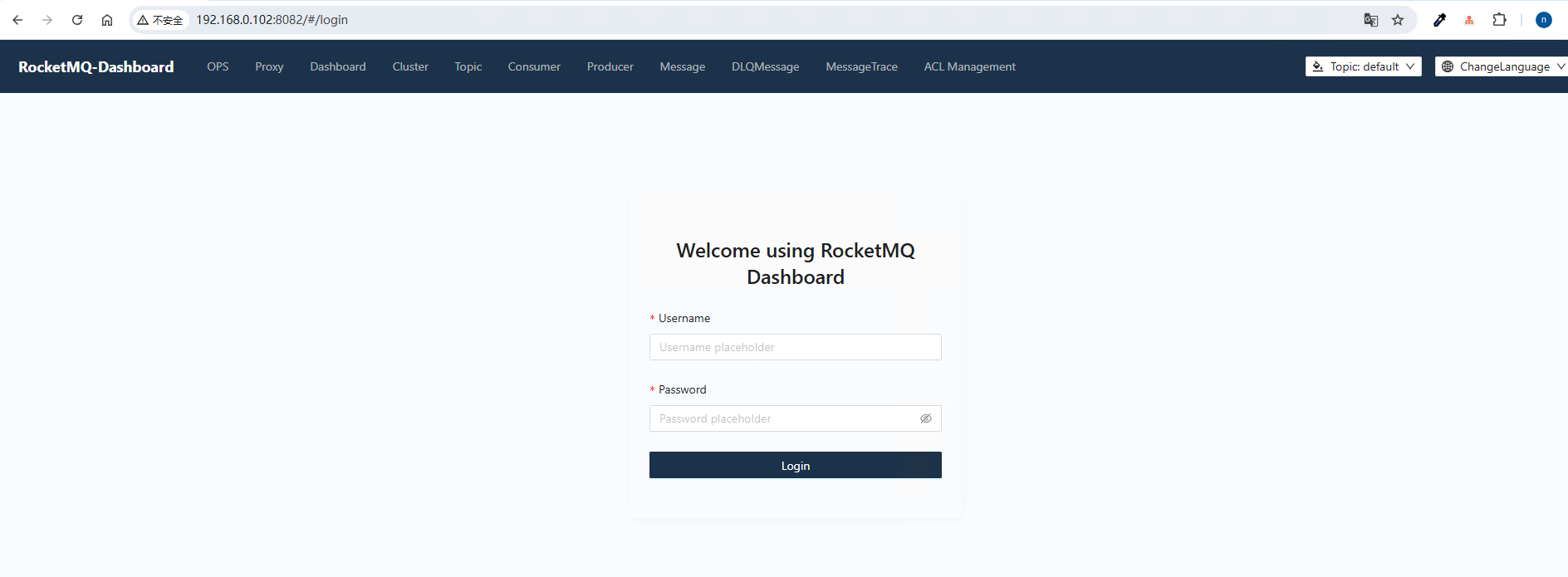
配置修改完成后重新打包重启,再进入页面就会提示输入账号密码了
nohup java -jar rocketmq-dashboard-2.1.1-SNAPSHOT.jar --server.port=8080 --rocketmq.config.namesrvAddr=192.168.0.61:9876;192.168.0.62:9876;192.168.0.63:9876 >> ./mq-console.log 2>&1 &
6.3、docker方式安装
除了源码安装方式,也可以用docker方式,而且更简单,只需要一条命令就可以启动
# 默认启动
docker run -d --name rocketmq-dashboard -e "JAVA_OPTS=-Drocketmq.namesrv.addr=192.168.0.61:9876;192.168.0.62:9876;192.168.0.63:9876" -p 8082:8082 -t apacherocketmq/rocketmq-dashboard:latest


# 开启鉴权,需要手动创建/home/ubuntu/tools/rocketmq/rocketmq-all-5.5.1-bin-release/conf/3m-3s-sync/dashboard-data这个目录,并且将users.properties文件放到这个目录下
docker run -d --name rocketmq-dashboard -e "JAVA_OPTS=-Drocketmq.namesrv.addr=192.168.0.61:9876;192.168.0.62:9876;192.168.0.63:9876" -e ROCKETMQ_CONFIG_LOGIN_REQUIRED=true -p 8082:8082 -v /home/ubuntu/tools/rocketmq/rocketmq-all-5.5.1-bin-release/conf/3m-3s-sync/dashboard-data:/tmp/rocketmq-console/data -t apacherocketmq/rocketmq-dashboard:latest
或者用docker-compose
version: '3.8'

services:
  rocketmq-dashboard:
    image: apacherocketmq/rocketmq-dashboard:latest
    ports:
      - 8082:8082
    volumes:
      # 数据目录映射, user.properties需要放在data目录下
      - /home/ubuntu/tools/rocketmq/rocketmq-all-5.5.1-bin-release/conf/3m-3s-sync/dashboard-data:/tmp/rocketmq-console/data
    environment:
      - NAMESRV_ADDR=192.168.0.61:9876;192.168.0.62:9876;192.168.0.63:9876
      # 开启登录认证
      - ROCKETMQ_CONFIG_LOGIN_REQUIRED=true
如果docker镜像拉取不下来也可用用我自己保存下来的镜像:registry.cn-hangzhou.aliyuncs.com/xhsx/rocketmq-dashboard:latest